Your laptop screen wobbles when you type, drifts backwards on its own, or the lid has started to creak every time you open it. If you are wondering how to fix a laptop hinge that’s loose or broken, the first thing to know is that the hinge itself is only part of the story.
Hinges are fixed to the laptop’s casing and carry the display cable through them. Wear, a knock or years of one-handed opening can loosen the hinge, crack the plastic around it or put strain on the cable. This guide shows what you can check safely at home, what makes it worse and when it needs a repair.
| Quick Answer To fix a laptop hinge that’s loose or broken, first check whether the hinge screws or covers are loose, then look for cracks in the plastic around the hinge. A hinge that is only slightly loose may be tightened carefully. A broken hinge, a cracked casing or a screen that wobbles badly needs a technician, because forcing the lid can damage the display cable. |
Key Takeaways
- Stop opening and closing the lid by the corner of the screen. Lift it from the centre of the top edge to reduce strain.
- A hinge problem is often a casing problem: cracked plastic around the hinge mounts is one of the most common causes of a loose lid.
- Don’t use glue, tape or superglue on a hinge. It hardens the joint and makes a proper repair harder.
- A flickering screen, lines on the display or a lid that won’t stay open can mean the display cable is under strain.
- A hinge repair done early is simpler than one done after the casing has split or the screen has cracked.
What a Laptop Hinge Does
The hinges sit at the back corners of the laptop and let the lid open, hold its angle and close. Each hinge has a metal bracket attached to the screen and another anchored into the base. Hinges are built with tension, so the screen stays where you place it.
The display cable, a thin ribbon that carries the picture to the screen, usually passes close to or through the hinge area. That is why a bad hinge is more than a cosmetic fault. Constant bending and force on a loose hinge can pinch that cable.
7 Common Causes of a Loose or Broken Laptop Hinge
- Wear over time. Opening and closing the lid thousands of times loosens the hinge tension.
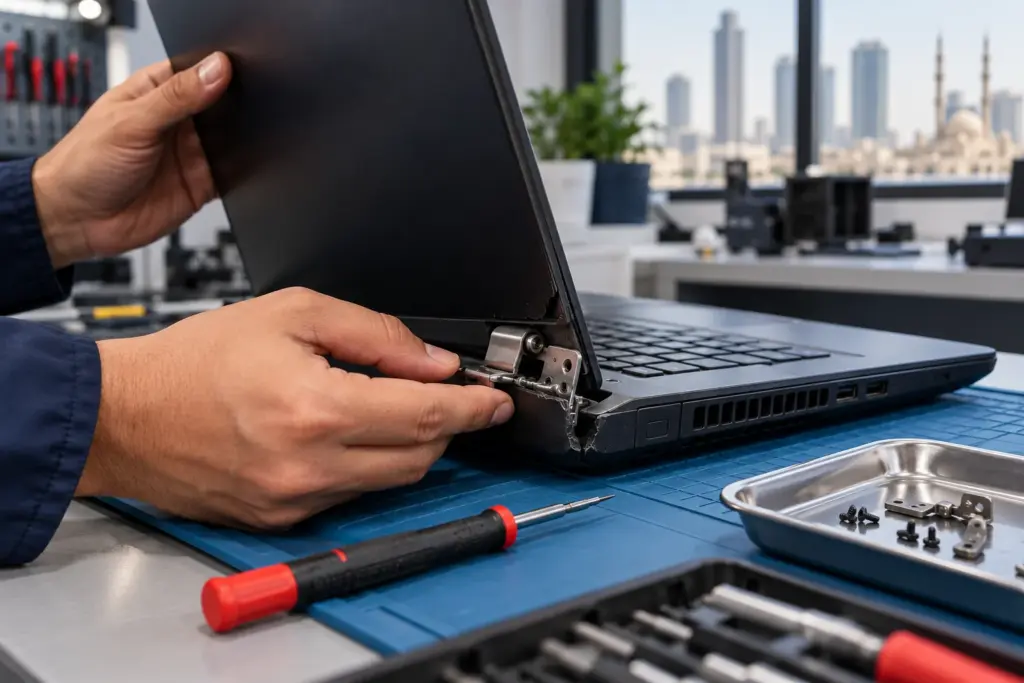
- Cracked plastic around the hinge mount. The bracket is screwed into plastic posts that can split under stress.
- Lifting or opening the lid from one corner, which twists the hinge on one side.
- Carrying the laptop by the screen or squeezing a full bag that presses on the lid.
- A drop or knock that bends the hinge bracket or tears it out of the casing.
- Screws that have worked loose with heat and vibration.
- Closing the lid on a pen, a cable or a charger, which puts sudden pressure on the hinge.
Symptoms and What They Usually Mean
| What You Notice | Likely Cause | What to Do |
|---|---|---|
| Screen wobbles when you type | Loose hinge tension or loose screws | Check for loose screws, avoid forcing the lid |
| Lid falls back and won’t stay open | Worn hinge | Hinge repair or replacement |
| Creaking or clicking when opening | Dry or worn hinge, or flexing casing | Inspect the hinge area |
| Gap between lid and base on one side | Cracked hinge mount or bent bracket | Stop using the lid, book a repair |
| Cracked plastic near the hinge | Split mounting post | Repair the casing and hinge together |
| Screen flickers when you move the lid | Display cable under strain | Stop moving the lid, get it checked |
| Hinge snapped or detached | Broken bracket | Replacement needed |
Safe Checks You Can Do at Home
You can run a few checks without opening the laptop. Switch the laptop off and disconnect the charger before you start.
- Look at the hinge area from the back of the laptop. Check for cracks, a gap between the hinge and the casing, or a raised screw head.
- Open the lid slowly from the centre of the top edge. Watch whether one side moves differently from the other.
- Look for separation or flexing without pressing on a cracked area or forcing the lid.
- Only adjust an exposed screw if your model’s service guide identifies it and describes the procedure. Do not remove covers, guess at hinge tension or overtighten; otherwise leave this to a technician.
- Don’t lift the laptop by the screen while you test, and don’t force a stiff hinge.
If a gentle check shows cracked plastic, a gap or a hinge that has moved, stop there. Tightening a screw into split plastic doesn’t hold, and forcing it can finish breaking the mount.
What Not to Do
- Don’t use superglue, epoxy or tape on the hinge. It is rarely strong enough, and it makes a proper repair harder.
- Don’t spray oil or lubricant into the hinge. It can run onto the display cable or into the keyboard area.
- Don’t keep using a lid that has detached. Each use stresses the display cable and risks a cracked screen.
- Don’t open the laptop base without knowing the screws and clips. Cracked casings and torn ribbon cables are common results.
Why Early Repair Costs Less
A hinge that is only loose is usually a smaller repair than one that has broken. When a loose hinge keeps being used, the mounting post can split, the casing around it can crack and the lid can tear away from the base. At that point the repair may involve the casing as well as the hinge.
The worst case is a damaged display cable or a cracked screen. If the screen flickers, shows lines or goes dark when you move the lid, stop moving it and have it checked.
What a Professional Hinge Repair Involves
A technician opens the laptop, inspects the hinges, brackets and casing, and checks the display cable. Depending on what they find, the repair can include replacing the hinges, repairing or rebuilding the mounting points, or replacing the damaged section of the casing. The display cable is tested before the laptop is closed up again.
What is needed depends on the laptop model, which is why the diagnosis comes before the quote.
How to Open and Carry a Laptop Without Straining the Hinge
A few habits protect the hinge and make a repair last.
- Open the lid from the middle of the top edge with both hands, or at least with one hand placed near the centre. Lifting from a corner twists the hinge.
- Carry the laptop closed, by the base, and not by the screen or the lid corner.
- Keep heavy items out of the bag compartment that holds the laptop, since pressure on the lid bends the hinge.
- Make sure nothing is on the keyboard, such as a pen or cable, before you shut the lid.
- Don’t lean on the open screen, and don’t push it past its normal opening angle.
Hinge Repair or a New Laptop?
For most laptops, repairing the hinge costs far less than replacing the laptop, particularly when the rest of the machine works well. A replacement can make more sense on a very old laptop with several other faults, or on a model where the casing is so damaged that the lid can’t be fixed to the base reliably. A technician can tell you after looking at the hinge and the casing.
Questions to Ask Before a Hinge Repair
- Is the damage only to the hinge, or to the casing and display cable as well?
- Does the repair include testing the display cable?
- Is a replacement hinge available for my laptop model, or does the casing need rebuilding?
- What warranty covers the repair?
Signs the Display Cable May Already Be Damaged
The display cable is thin and carries the picture to the screen, so it is the part to worry about when a hinge fails. Stop using the lid and book a check if you notice any of these:
- The screen flickers, goes dark or shows coloured lines when you move the lid.
- Part of the screen looks washed out or has vertical stripes.
- The picture only comes back when you hold the lid at a particular angle.
- An external monitor shows a normal picture while the laptop screen doesn’t, which suggests the cable or the screen, not the graphics hardware.
Hinge Problems on 2-in-1 and Touchscreen Laptops
Convertible laptops rotate through 360 degrees, so their hinges work harder than a standard clamshell. A stiff or uneven hinge on these models can twist the casing and strain both the display cable and the touchscreen. If a convertible’s hinge feels gritty, uneven or loose, it is worth having it inspected before it fails fully.
What to Expect Getting It Fixed in Sharjah
Bring the laptop in and a technician examines the hinge, the casing and the display cable, then gives you a free quote before any work starts. Laptop hinge repair is a walk-in service for all major laptop brands, and repairs carry a 6-month parts warranty.
Frequently Asked Questions
Can I fix a loose laptop hinge myself?
Only adjust an exposed screw if your model’s service guide identifies it and gives a safe procedure; otherwise have a technician check it. If the plastic around the hinge is cracked or the hinge has moved, a home fix usually doesn’t hold and can make the damage worse.
Why does my laptop screen wobble when I type?
Loose hinge tension, loose screws or a cracked hinge mount lets the screen move. It is a sign of wear that tends to get worse.
Is it safe to use a laptop with a broken hinge?
It is risky. Opening and closing the lid can strain the display cable or crack the screen, so it is better to stop moving the lid until it is checked.
Can I use glue on a broken laptop hinge?
No. Glue and tape rarely hold under the constant movement of a hinge, and they can make a proper repair harder.
Why does my laptop lid creak when I open it?
Creaking can come from a worn hinge, flexing casing or a loose mount. If it is getting louder or the lid feels uneven, have the hinge inspected.
How much does laptop hinge repair cost?
It depends on the laptop model and whether the casing is damaged as well as the hinge, so the quote is confirmed free after assessment.
The Bottom Line
Knowing how to fix a laptop hinge that’s loose or broken mostly comes down to knowing what not to force. A quick check for loose screws, cracked plastic and a gap at the hinge tells you whether you are dealing with wear or damage. If the casing has split, the lid won’t stay up or the screen flickers when you move it, stop using the lid and get the hinge looked at before the display cable pays for it. Bring it in for a free assessment and a clear quote, backed by a 6-month parts warranty.