A few keys stop responding, or a letter types twice every time you press it. You clean around the keys and it helps for a day. Then it comes back. These are the usual signs your laptop keyboard needs replacement, and they tend to get worse rather than better.
The tricky part is that a faulty keyboard looks a lot like a software setting or a dirty key. This guide separates the two, shows what you can test in a few minutes and explains when cleaning stops being enough.
| Quick Answer Your laptop keyboard needs replacement when multiple keys fail or stay unresponsive, keys type repeatedly or on their own, the problem returns after cleaning, or a liquid spill has reached the keyboard. An external keyboard comparison helps narrow the problem towards the built-in keyboard, its connection or its driver, but does not prove that replacement is required. |
Key Takeaways
- Test with an external USB keyboard first. If it works normally, investigate the built-in keyboard, its connection and device-specific software before replacing parts.
- One sticky key is often a cleaning job, but several dead keys or a whole row failing points to the keyboard itself.
- Keys that type by themselves or repeat endlessly usually mean a faulty keyboard membrane or a liquid-affected circuit.
- Liquid spills should be dealt with quickly, since sugary drinks leave residue that keeps causing faults after they dry.
- On many laptops the keyboard is a replaceable part, and on some models it is part of the top case, which changes the repair.
Rule Out Software Before You Blame the Keyboard
A few settings produce keyboard symptoms that have nothing to do with hardware. Check these first:
- Sticky Keys and Filter Keys. These accessibility options can delay or ignore keystrokes if they are switched on by accident.
- The wrong keyboard language or layout. If the symbols on the keys don’t match what appears on screen, the layout is the cause.
- A driver or update fault. Restarting the laptop and installing pending updates clears many of these.
- An external keyboard test. A working USB keyboard helps narrow the problem towards the built-in keyboard, its connection or its driver. Similar faults on both suggest checking system settings and software too.
7 Signs Your Laptop Keyboard Needs Replacement
- Several keys stop working, especially keys next to each other or a whole row. Neighbouring dead keys suggest a damaged keyboard circuit.
- A key types more than once, or keeps repeating a character when you press it once.
- Letters appear on their own, or the cursor jumps while you are not typing. This points to a faulty keyboard membrane or short.
- The problem returns after cleaning. If compressed air and careful cleaning fix it only for a few days, the cause is not dirt.
- Keys feel loose, wobble, or sit unevenly because the clips or hinges beneath them are broken.
- The backlight is patchy or has stopped on some keys while the rest of the keyboard still lights.
- The keyboard stopped working after a liquid spill. Residue can keep corroding contacts even after the surface looks dry.
Cleaning Problem or Replacement Problem?
| What You Notice | Most Likely Cause | Next Step |
|---|---|---|
| One key feels sticky or crunchy | Dust or crumbs under the key | Clean with compressed air |
| One key won’t register at all | Dirt, a damaged keycap or a broken clip | Inspect the key, then clean or repair it |
| Several neighbouring keys are dead | Damaged keyboard circuit | Test with external keyboard, plan a replacement |
| Keys type by themselves | Faulty membrane or liquid damage | Switch off and have it checked |
| Works with external keyboard but not built-in | Built-in keyboard or its cable | Keyboard repair or replacement |
| Problem began after a spill | Liquid residue on the keyboard circuit | Switch off and bring it in quickly |
| Same problem on external keyboard | Software setting or driver | Check settings and update the system |
What to Do After a Liquid Spill
Speed matters more than anything else after a spill on a laptop keyboard. Do these in order:
- Switch the laptop off straight away and unplug the charger.
- Keep it switched off and stable. Do not shake it or repeatedly tilt it; avoid moving liquid further into the device and seek prompt inspection.
- Do not power it on to check whether it still works.
- Don’t use a hairdryer. Heat can push moisture deeper and warp the plastic.
- Bring it in as soon as you can. Sugary drinks like juice and soft drinks leave a sticky residue that causes faults days later.
A keyboard spill can also reach the motherboard below it. A prompt check lets a technician clean the affected area before corrosion spreads.
Why Some Keyboards Are Harder to Replace Than Others
On many Windows laptops, the keyboard is a separate part held in by screws or clips. Replacing it is a contained repair. On other laptops, and on MacBooks in particular, the keyboard is built into the top case along with other parts, which makes the repair larger.
Some MacBook models from 2015 to 2019 used a thin butterfly keyboard design that was prone to failure from small amounts of dust. If you have one of those models and keys are sticking or double-typing, a replacement is often the lasting fix.
Why You Shouldn’t Keep Using a Failing Keyboard
A failing keyboard is more than an annoyance. Phantom key presses can trigger shortcuts, delete text, or type into the wrong window. Typing a password with missing keys also leads to lockouts. If the fault comes from liquid, delaying the repair gives corrosion time to spread to the board below, which turns a keyboard repair into a larger one.
How to Test Your Laptop Keyboard Properly
Testing the whole keyboard takes a couple of minutes and gives you a clear list to show a technician.
- Open a blank text document and press every key once, including the number row, punctuation keys and the space bar.
- Press and hold a few keys to check they don’t repeat endlessly or stick down.
- Try the function keys and the backlight shortcut, since these use the same keyboard circuit.
- Plug in an external keyboard and repeat any key that failed. Note which behaves differently.
- Write down the dead keys. A cluster of neighbouring keys points to a damaged circuit, while scattered single keys can point to dirt or worn contacts.
Using an External Keyboard While You Wait
A USB or Bluetooth keyboard is a sensible stopgap if you depend on the laptop for work. Use this only when there is no liquid damage, overheating, swelling or other safety concern. An external keyboard does not prevent the built-in one from sending phantom inputs, so it is not a complete workaround for every fault.
How to Keep a Laptop Keyboard Working Longer
- Keep drinks away from the laptop. A closed bottle of water is safer than an open cup of tea or juice.
- Wipe the keys regularly with a slightly damp, not wet, microfibre cloth.
- Use short bursts of compressed air, held at an angle, to clear dust between the keys.
- Don’t eat over the keyboard. Crumbs and grease collect under keys and cause sticking.
- Close the lid gently and don’t leave pens or earphones on the keyboard when you shut it, since they can mark the screen and press on the keys.
Backlight Problems and Keyboard Replacement
If the keyboard backlight fails on some keys while the others still light up, the keyboard’s lighting layer is usually faulty. The problem often shows up together with dead keys, and a replacement fixes both. If the backlight has stopped on every key and the keyboard types normally, a setting or a shared lighting fault is a more likely cause, and a technician can tell which.
What Happens During a Keyboard Replacement
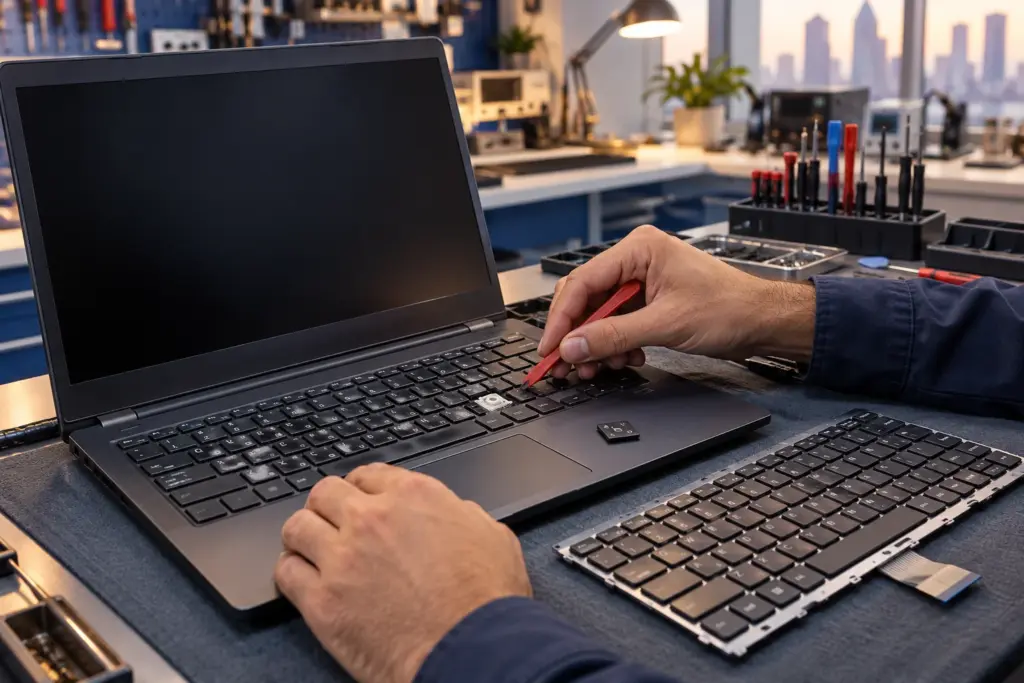
The process depends on the laptop. On many Windows laptops, the technician removes the bottom cover and the battery connection, releases the old keyboard from its clips or screws, disconnects the ribbon cable and fits the new one. On models where the keyboard is part of the top case, the whole top case assembly may need to be swapped.
After the new keyboard is fitted, every key and the backlight are tested before the laptop is handed back. Keyboard repair normally does not require changing the storage drive. Back up accessible files first, and ask the technician to confirm a data-preserving repair.
Can a Single Key Be Fixed?
Sometimes. If only a keycap has popped off, it can often be clipped back on, or a replacement keycap can be fitted. If the plastic clip under the key is broken, or the contact beneath it is worn, a single-key fix is less reliable. When more than one key is affected, replacing the whole keyboard is usually the cleaner repair than patching keys one at a time.
Don’t Ignore Early Warning Signs
A keyboard rarely fails all at once. It usually starts with a key that needs a harder press, a letter that sometimes doubles, or a corner that stops responding for a minute and then recovers. Those are the signs to act on. Catching the fault early means a smaller repair, and it protects the board underneath if liquid is involved.
What to Expect Getting It Fixed in Sharjah
A technician tests the keyboard, confirms whether it can be cleaned, repaired or needs replacing, and gives you a free quote before any work starts. Laptop keyboard replacement is a walk-in service for all major laptop brands, and repairs carry a 6-month parts warranty.
Frequently Asked Questions
How do I know if my laptop keyboard is broken or just dirty?
One sticky key is usually dirt. Several dead keys, keys that type by themselves, or a problem that returns after cleaning point to a faulty keyboard.
Why is my laptop typing by itself?
This is most often a faulty keyboard membrane or liquid residue shorting the circuit. Test with an external keyboard, and have the laptop checked if the problem continues.
Can I replace a laptop keyboard myself?
On some models, yes. On others the keyboard is built into the top case, and a mistake can damage ribbon cables. A technician checks which type your laptop has.
My keyboard stopped working after a spill. Can it be saved?
Often it can, if the laptop is switched off quickly and brought in soon. Cleaning the affected area early prevents corrosion from spreading.
Does a keyboard problem affect the rest of the laptop?
Not usually, but a liquid spill can reach the motherboard under the keyboard. That is another reason to have a spill checked.
How much does a laptop keyboard replacement cost?
It depends on the laptop model and whether the keyboard is a separate part or part of the top case, so the quote is confirmed free after assessment.
The Bottom Line
Most of the signs your laptop keyboard needs replacement show up in a pattern: several keys failing together, keys typing without being pressed, or a fault that returns after every clean. An external keyboard test tells you in a minute whether the built-in one is at fault. Don’t wait if a spill is involved. Bring it in for a free assessment and a clear quote, backed by a 6-month parts warranty.